
Get Recommendor WooCommerce Documentation
Complete reference guide for all 12 modules and settings tabs available in the Get Recommendor for WooCommerce WordPress plugin.
System Requirements & Compatibility
Step 1: Download & Install Plugin ZIP
Log into your Get Recommendor Portal and download the latest release archive recommendor-for-woocommerce.zip.
- In your WordPress Sidebar Admin Menu, navigate to Plugins > Add New Plugin.
- Click the Upload Plugin button at the top left of the page.
- Click Choose File, select your downloaded
recommendor-for-woocommerce.zippackage, and click Install Now. - After WordPress completes extraction, click Activate Plugin.
Step 2: Connect API Key & Store ID Credentials
Your Store ID and secret API Key establish a secure handshake between your WooCommerce store and Get Recommendor's AI cloud cluster.
- Log into your account dashboard at getrecommendor.com.
- Navigate to Store Settings > API Credentials and copy your 32-character Store ID and API Key.
- Return to WordPress Admin and click Recommendor > Settings > General Settings.
- Paste your Store ID and API Key into the input fields and click Save Settings.
Step 3: Perform Initial Catalog Bulk Sync
Get Recommendor requires an initial indexing of your store's product catalog (titles, categories, attributes, prices, image URLs, and stock status) to construct vector recommendations.
- In WordPress Admin, navigate to Recommendor > Settings.
- Scroll down to Catalog Synchronization and click the Start Bulk Sync button.
- The plugin will process products in asynchronous background batches of 50 items per payload.
- Allow the progress bar to reach 100% Complete.
Once initial indexing is finished, you do not need to run bulk sync again manually. The plugin hooks into WooCommerce product save events (save_post_product and woocommerce_update_product) to automatically push real-time updates whenever products are created, edited, or inventory changes.
1. Similar Products Recommendations
AI Machine Learning vector similarity engine for single product page recommendations.
The Similar Products module surfaces high-affinity substitute items on WooCommerce single product pages. Instead of requiring store owners to manually link cross-sells or up-sells for thousands of catalog items, Get Recommendor utilizes continuous vector embeddings computed on cloud AI servers.
The recommendation engine continuously evaluates product titles, categories, tags, attributes (size, color, material), regular/sale prices, and descriptions to compute nearest-neighbor cosine similarity scores.
End-to-End Execution Lifecycle & Architecture
WooCommerce Page Injection Hook
When a visitor opens a product page, the plugin fires the woocommerce_after_single_product_summary action hook (priority 15) calling wc_recommendor_single_product_similar().
Shortcode & Product ID Resolution
Executes [reco type="similar"]. If no explicit product_id attribute is supplied, it automatically resolves the current post ID from global $post->ID.
Transient Caching & API Request
Calls Reco_Similar::get($product_id, $limit). Checks transient cache key reco_similar_{id}_{limit}. On miss, sends HTTP GET request with X-API-Key to api.getrecommendor.com/recommendations/similar.
Purchasable Filter & Layout Rendering
Filters returned IDs through wc_recommendor_filter_purchasable() to prevent out-of-stock or hidden items from displaying. Loads template templates/similar-products.php.
WordPress Admin Options Reference
| Setting Field | Description & Configuration |
|---|---|
| Widget Heading Title | Custom title displayed above recommendations. Default: "You may also like..." |
| Max Products Count | Number of similar products to fetch from API. Default: 8 (Configurable 1 to 12). |
| Grid Column Count | Columns grid count on desktop storefronts. Default: 4 (Options: 2, 3, 4, 5, 6). |
| Enable Slider Carousel | Enable Swiper touch slider carousel with navigation arrows. Default: "yes" |
API responses are cached in WordPress transients using key format reco_similar_{$product_id}_{$limit} for 24 hours. Transients are automatically invalidated whenever a product is saved or inventory changes (delete_transient( "reco_similar_{$post_id}" )).
Developer Usage & Shortcode Snippets
[reco type="similar" limit="4" columns="4"] or [reco_similar limit="4" columns="4"]<?php
$similar_ids = Reco_Similar::get( get_the_ID(), 4 );
if ( ! empty( $similar_ids ) ) {
echo do_shortcode( '[reco_similar limit="4"]' );
}
?>2. Personalized Recommendations ("Recommended for You")
Hyper-personalized recommendation engine driven by visitor browsing clickstream and customer order history.
The Personalized Recommendations module builds individualized customer profiles by tracking real-time user interactions—including product views, category affinity, cart additions, and past WooCommerce order histories.
Unlike static best-seller lists, this module continuously refines individual preference vectors for both authenticated customers and guest visitors, delivering personalized suggestions across the store homepage, category pages, cart drawer, and My Account dashboard.
User Tracking & End-to-End Execution Architecture
User & Session Identification
Checks if the visitor is logged in using get_current_user_id(). For guest shoppers, it identifies session vectors via cookie reco_session_id or WooCommerce session WC()->session->get_customer_id().
Transient Caching & API Request
Constructs transient key reco_personalized_user_{id} (or sess_{hash}). On cache miss, queries SaaS endpoint api.getrecommendor.com/recommendations/personalized with user/session parameters.
Multi-Level Cold-Start Fallback
If a new guest visitor has no clickstream history, the engine automatically falls back to Reco_Trending::get() and backfills with recent in-stock items via wc_get_products().
My Account Hook & Template Render
Hooked to woocommerce_account_dashboard (priority 20) to display "Recommended for You" on customer account pages. Loads template templates/personalized-products.php.
WordPress Admin Options Reference
| Setting Field | Description & Configuration |
|---|---|
| Enable Personalized Recs | Master toggle for personalized recommendation widgets store-wide. Default: "yes" |
| Widget Heading Title | Heading title displayed above recommendations. Default: "Recommended for You" |
| Max Products Count | Maximum number of personalized items to fetch. Default: 8 (Configurable 1 to 12). |
| Grid Column Count | Grid column count for desktop storefront layout. Default: 4 (Options: 2, 3, 4, 5, 6). |
| Enable Slider Carousel | Enable Swiper touch slider carousel with navigation controls. Default: "yes" |
| My Account Dashboard Display | Automatically display personalized items on My Account customer dashboard. Default: "yes" |
Personalized results are cached individually per user or guest session for HOUR_IN_SECONDS (1 hour). This guarantees fast page loads while frequently updating as customer browsing intent changes.
Developer Usage & Shortcode Snippets
[reco type="personalized" limit="6" columns="4"] or [reco_personalized limit="6" columns="4"]<?php
$user_id = get_current_user_id();
$personalized_ids = Reco_Personalized::get( $user_id, null, 6 );
if ( ! empty( $personalized_ids ) ) {
echo do_shortcode( '[reco_personalized limit="6"]' );
}
?>3. Frequently Bought Together (FBT)
Market basket co-occurrence bundle engine with Amazon-style single-click bundle Add to Cart.
The Frequently Bought Together (FBT) module analyzes historical WooCommerce order transactions to discover co-purchase affinities. It identifies complementary accessories that shoppers consistently purchase alongside the main item.
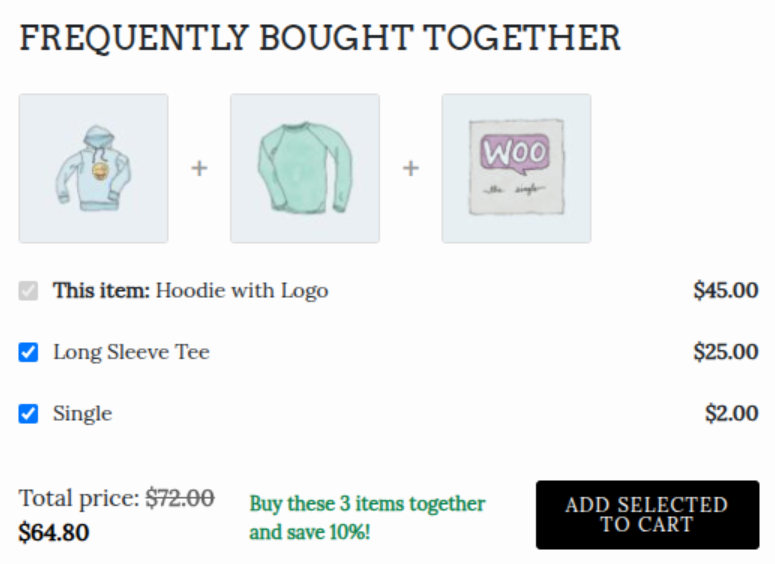
It renders an interactive bundle widget featuring individual product checkboxes, calculated total bundle price, optional percentage discounts, and a single "Add All to Cart" action button.
🛍️ Storefront Bundle Widget
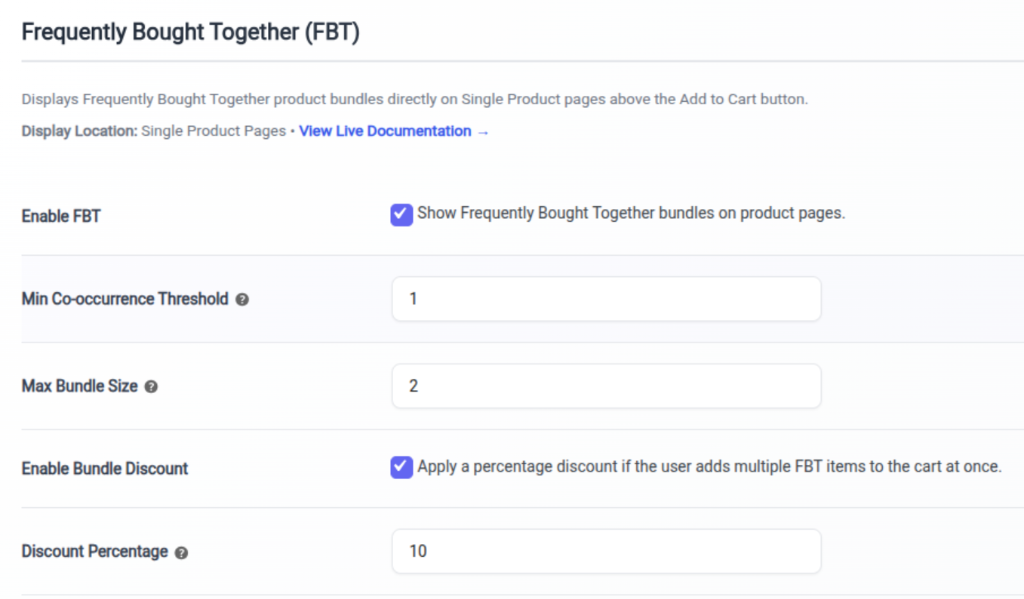
⚙️ Admin FBT Configuration
End-to-End Execution Architecture
Single Product Action Hook
Hooked into woocommerce_after_single_product_summary (or positioned above Add to Cart button).
Co-occurrence Data Query
Calls Reco_FBT::get($product_id) checking transient cache key reco_fbt_{id} before querying the central API.
Bundle Pricing Calculation
Computes cumulative bundle price and applies configured bundle discount (wc_recommendor_fbt_discount_percent).
AJAX Batch Cart Insertion
When shoppers click "Add Bundle to Cart", AJAX submits selected IDs to add all checked products to the WooCommerce cart simultaneously.
WordPress Admin Options Reference
| Setting Field | Description & Configuration |
|---|---|
| Enable FBT Bundles | Toggle Frequently Bought Together bundles on product pages. Default: "yes" |
| Widget Heading Title | Title displayed above bundle widget. Default: "Frequently Bought Together" |
| Max Bundle Items | Maximum recommended add-on items in a bundle. Default: 2 (Options: 1 to 4). |
| Enable Bundle Discount | Apply percentage discount when customers buy full bundle. Default: "no" |
| Discount Percentage | Percentage discount applied to total bundle price. Default: 10 |
Shortcode & Developer API Example
[reco type="fbt" limit="2" discount="10"] or [reco_fbt limit="2" discount="10"]4. Customers Also Bought (Cart & Checkout Affinity)
Cross-sell recommendation engine driven by order basket co-purchase analytics.
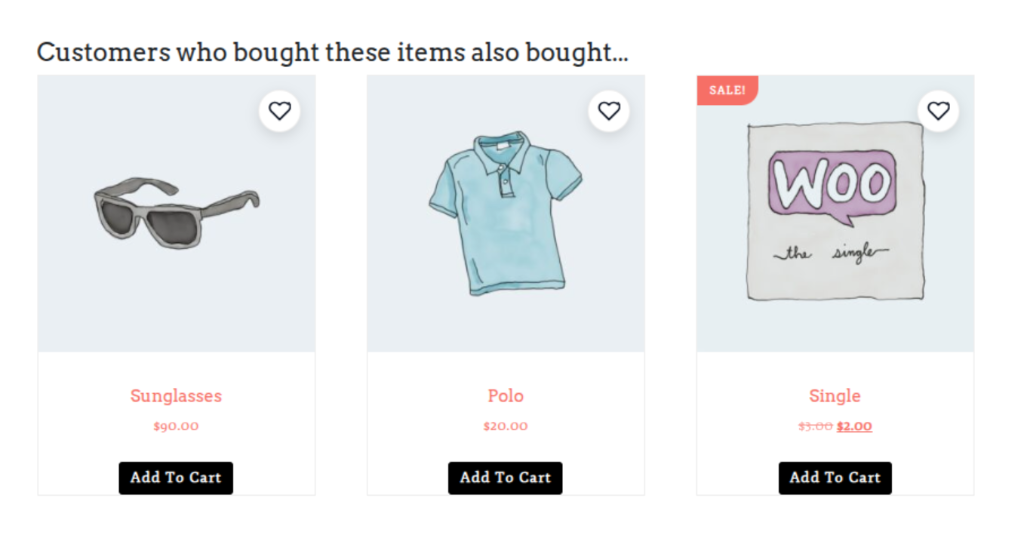
The Customers Also Bought module analyzes items added to the customer's shopping cart and queries co-purchase graph algorithms to suggest relevant complementary items.
It is optimized specifically for Cart Drawer overlays, Cart pages, and Checkout pages to increase Average Order Value (AOV) right before final order placement.
🛍️ Storefront Cart Cross-Sells Widget
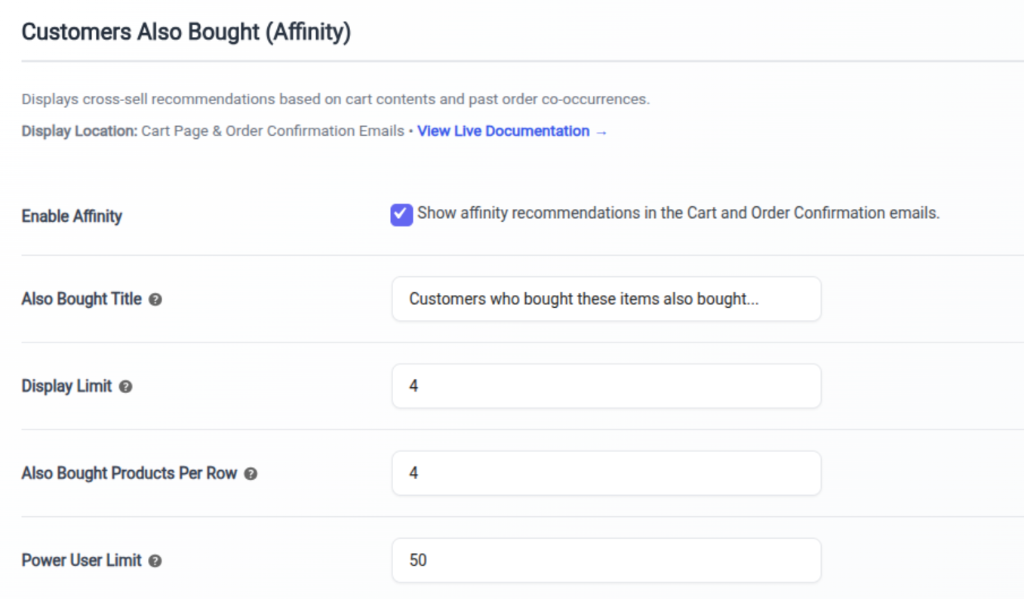
⚙️ WordPress Admin Configuration
End-to-End Cart & Checkout Execution Architecture
Cart Inspection Hook
Monitors active WooCommerce cart items via WC()->cart->get_cart().
Basket Affinity API Fetch
Calls Reco_Also_Bought::get_for_cart() passing current cart product IDs to API endpoint api.getrecommendor.com/recommendations/also-bought.
Duplication Deduplication
Automatically filters out items that are already in the customer's cart so shoppers are never recommended products they have already added.
Cart & Checkout Hook Placement
Renders automatically on woocommerce_after_cart_table and woocommerce_review_order_before_payment.
WordPress Admin Options Reference
| Setting Field | Description & Configuration |
|---|---|
| Enable Also Bought | Toggle "Customers Also Bought" widgets on Cart and Checkout pages. Default: "yes" |
| Widget Heading Title | Title displayed above cross-sell recommendations. Default: "Customers Also Bought" |
| Max Products Count | Number of cross-sell products to display. Default: 4 (Options: 1 to 8). |
| Grid Column Count | Grid column layout count for desktop cart pages. Default: 4 (Options: 2, 3, 4, 5). |
Shortcode & Developer API Example
[reco type="also_bought" limit="4"] or [reco_also_bought limit="4"]6. Out of Stock Alternatives
Automated in-stock alternative product suggestions to prevent customer bounce on out-of-stock items.
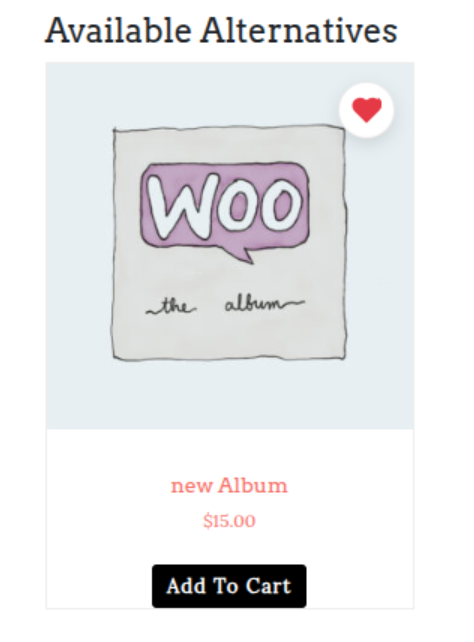
When a visitor lands on an out-of-stock product page, bounce rates spike significantly. The Out of Stock Alternatives module automatically detects inventory unavailability and renders in-stock substitute recommendations with similar specifications, prices, and categories.
This ensures shoppers immediately discover available alternative items without leaving your store.
🛍️ Storefront Alternative Product Card
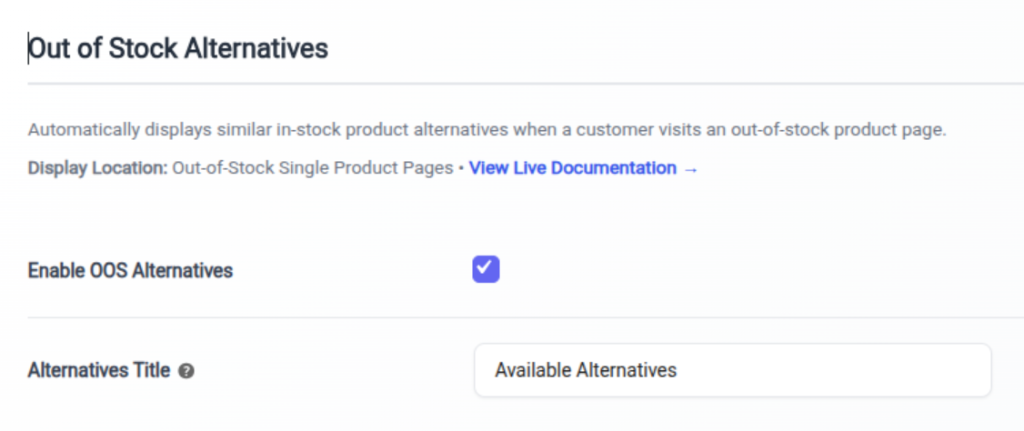
⚙️ WordPress Admin Configuration
End-to-End Stock Detection Architecture
Inventory Status Check
Monitors single product pages. Checks ! $product->is_in_stock() or stock quantity <= 0.
In-Stock Vector Query
Queries API for similar vector items and passes filter stock_status=instock to ensure only active, purchasable products are returned.
Price & Category Matching
Prioritizes in-stock items within the same category and price band (+/- 20% of original price) to maximize purchase probability.
Prominent Banner Placement
Renders directly below the "Out of Stock" notification badge on the single product detail page.
WordPress Admin Options Reference
| Setting Field | Description & Configuration |
|---|---|
| Enable OOS Alternatives | Toggle alternative recommendations when a product is out of stock. Default: "yes" |
| Widget Heading Title | Heading title displayed above alternatives. Default: "Currently Out of Stock — In-Stock Alternatives:" |
| Max Products Count | Number of in-stock substitute products to display. Default: 4 (Options: 2 to 8). |
Shortcode Integration Example
[reco_alternatives limit="4"]7. Smart Search Autocomplete & Filter Modal
Real-time live autocomplete search dropdown & full-page popup search filter modal.
The Smart Search Autocomplete module converts standard WordPress/WooCommerce search inputs into instant AI autocomplete dropdowns and full-screen search modals.
By attaching to existing theme search boxes using CSS selectors, it delivers instant live product suggestions (with thumbnails, sale badges, prices, and categories) as customers type.
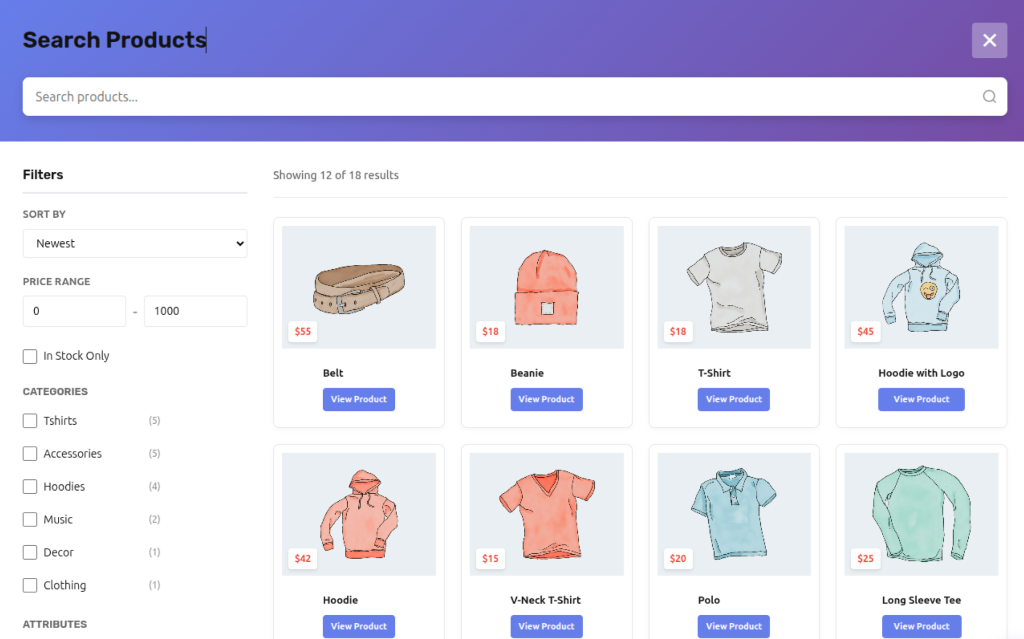
🔍 Full-Page Search Modal Storefront Preview
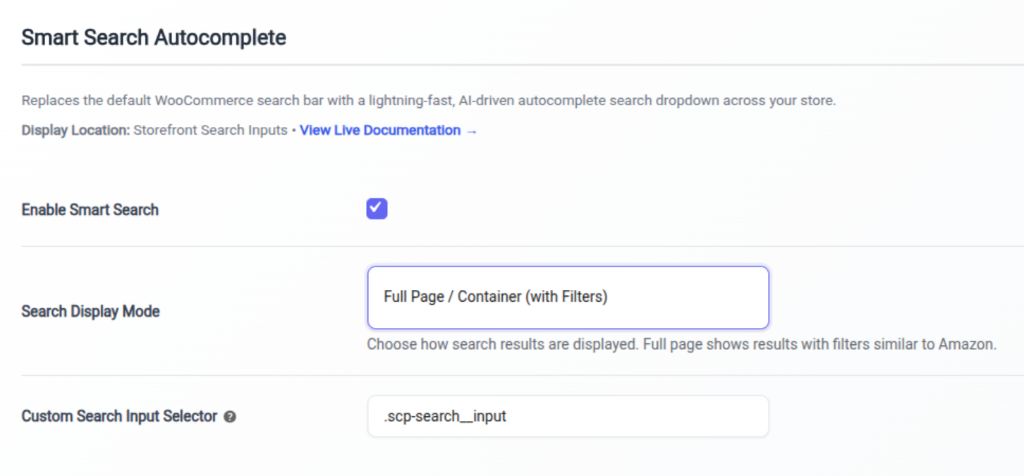
⚙️ WordPress Admin Configuration
End-to-End Search Attachment & Autocomplete Architecture
CSS Selector Target Binding
Script reco-search.js attaches event listeners to search inputs matching wc_recommendor_search_selector (e.g. input.search-field).
Debounced Live Query
Debounces keystrokes (250ms delay) and sends AJAX request to endpoint /wp-json/recommendor/v1/search.
Instant Visual Results Render
Renders live autocomplete dropdown with product image thumbnails, titles, prices, stock badges, and category tags.
Full-Page Modal Mode Option
When full_page mode is active, focusing the search box triggers an instant full-screen search modal with price range sliders and category filters.
WordPress Admin Options Reference
| Setting Field | Description & Configuration |
|---|---|
| Enable Smart Search | Toggle live search autocomplete functionality. Default: "yes" |
| Target CSS Selector | CSS selector targeting theme search inputs. Default: "input.search-field, .header-search input" |
| Search Display Mode | Choose between Autocomplete Dropdown or Full-Screen Search Modal. Default: "dropdown" |
| Search Placeholder Text | Placeholder text for search input. Default: "Search products..." |
Shortcode Integration Example
[reco_search placeholder="Search storefront..."]8. Catalog Mode & Quote Inquiry
Transform WooCommerce into a wholesale catalog mode store with quote inquiry modals.
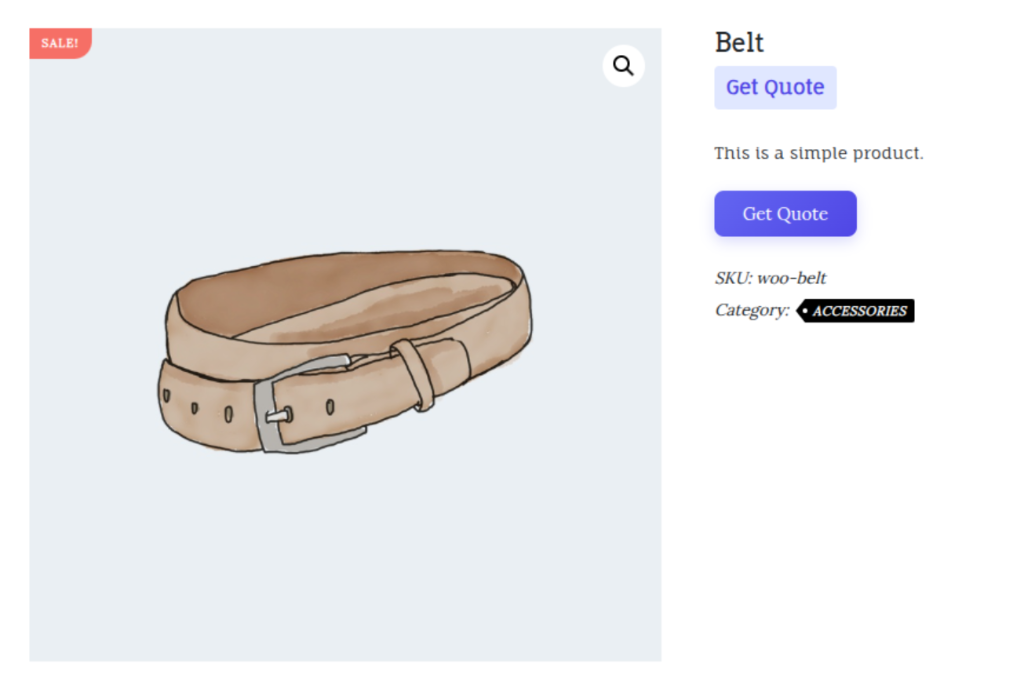
The Catalog Mode module turns your WooCommerce store into an online product showcase or B2B quote catalog.
It allows store owners to hide product prices, disable cart checkout, and replace standard "Add to Cart" buttons with customizable "Request a Quote" or "Inquire Now" modal forms.
🛍️ Storefront Single Product Page (Price Hidden & Get Quote Action Button)
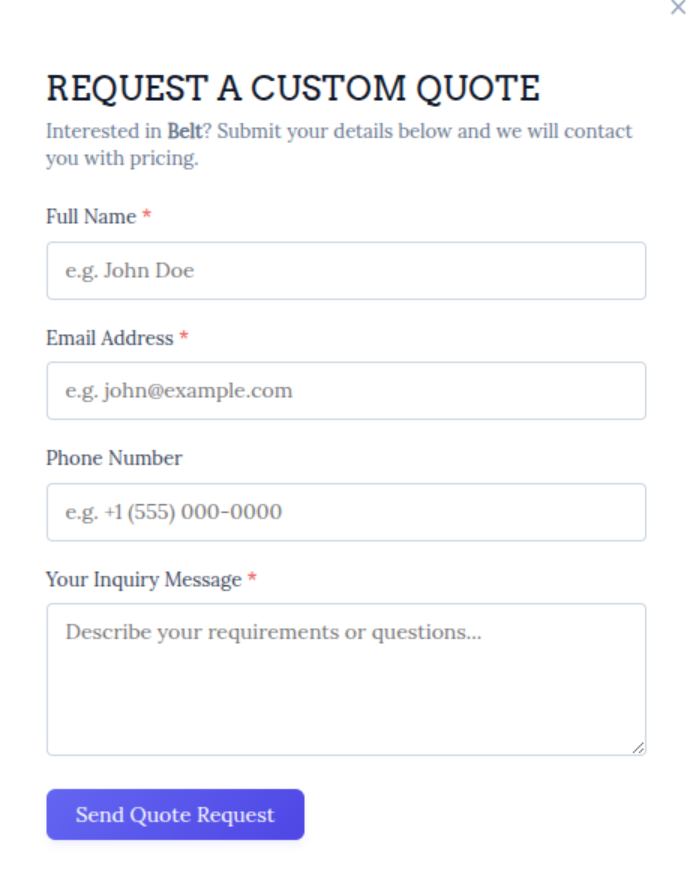
📩 Interactive "Request a Custom Quote" Modal Popup Form
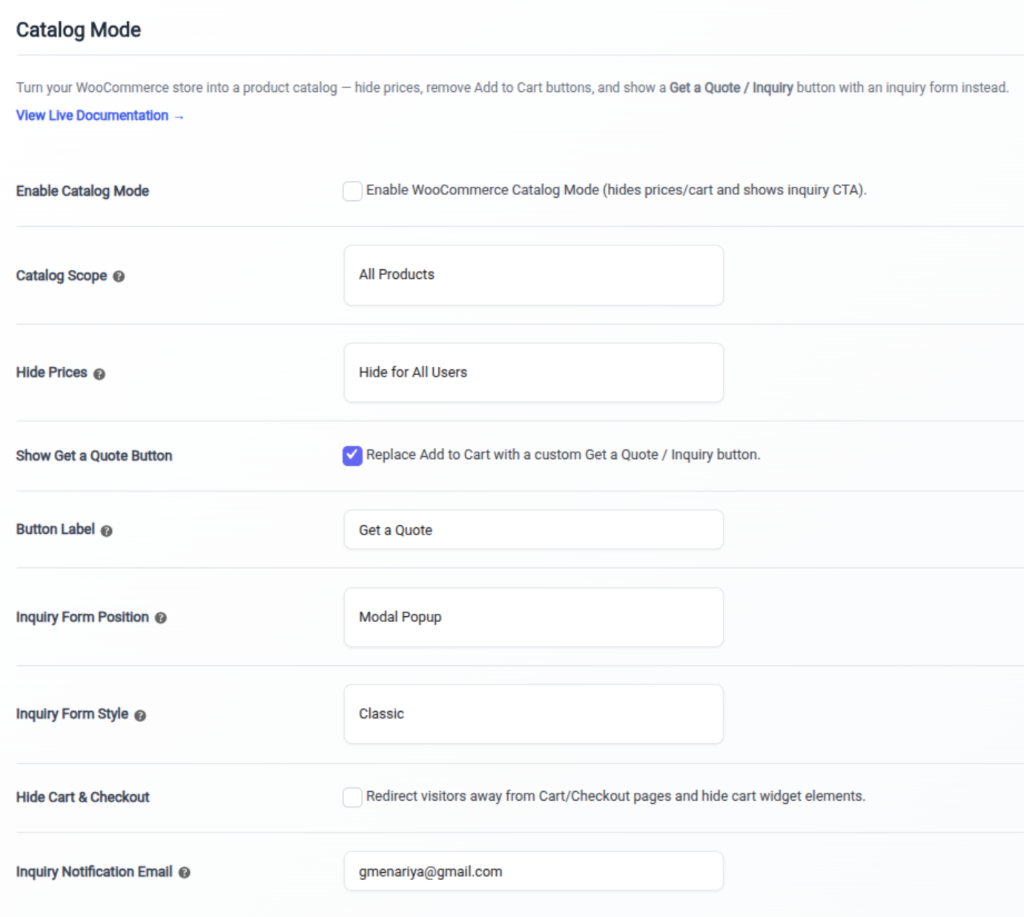
⚙️ WordPress Admin Catalog Mode Configuration
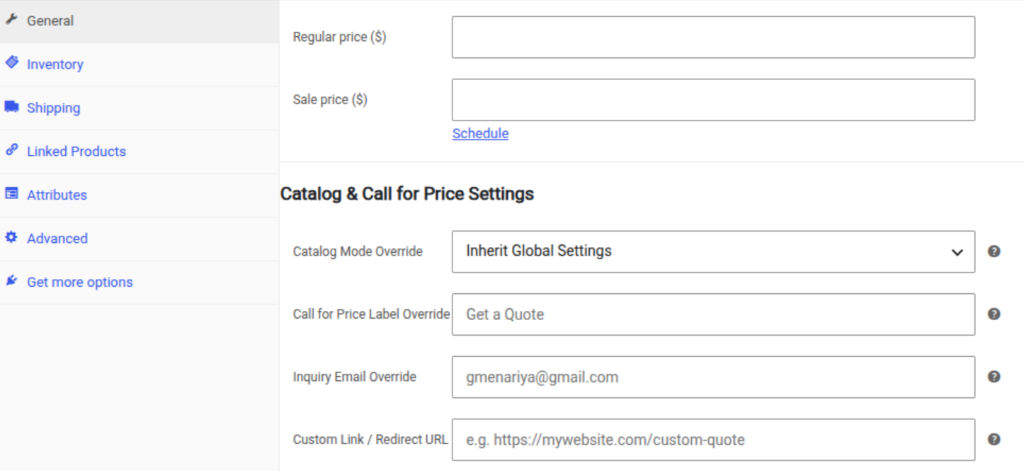
📦 Single Product Edit Metabox (Catalog & Call for Price Settings)
End-to-End Catalog Filtering Architecture
Price Hiding Filter
Hooks into woocommerce_get_price_html filter to strip price HTML or replace it with custom text (e.g. "Price Upon Request").
Add to Cart Button Suppression
Hooks into woocommerce_is_purchasable filter (returns false) and removes woocommerce_template_single_add_to_cart.
Quote Inquiry Button Render
Renders custom quote inquiry button (wc_recommendor_catalog_btn_text) opening an interactive quote modal form.
User Role & Category Rules
Configurable store-wide or scoped to unauthenticated guest visitors, specific user roles (e.g. wholesale customer), or selected product categories.
WordPress Admin Options Reference
| Setting Field | Description & Configuration |
|---|---|
| Enable Catalog Mode | Toggle catalog mode functionality store-wide. Default: "no" |
| Hide Prices | Hide product prices across storefront loop and detail pages. Default: "yes" |
| Inquiry Button Text | Custom button text replacing Add to Cart. Default: "Request a Quote" |
Shortcode Integration Example
[reco_catalog_inquiry]9. Product FAQs & Customer Reviews
AI-generated product FAQs accordion with Schema.org JSON-LD microdata and verified review highlights.
The Product FAQs & Reviews module automatically generates SEO-structured FAQ accordions based on product specs, warranty details, shipping info, and common buyer questions.
It injects valid Schema.org JSON-LD structured data to help product pages rank for Google Rich FAQ snippets while summarizing buyer review sentiment highlights into conversion trust badges.
End-to-End FAQ & Review Architecture
AI FAQ Generation
Analyzes product description, attributes, and category data to auto-generate relevant question and answer pairs (Reco_FAQ::get_for_product()).
Schema.org JSON-LD Microdata
Outputs valid <script type="application/ld+json"> containing FAQPage schema for search engine rich results.
Review Sentiment Extraction
Analyzes verified WooCommerce customer reviews (Reco_Review::get_summary()) to surface key rating metrics and positive buyer highlights.
Tab & Shortcode Rendering
Renders inside WooCommerce Product Tabs (woocommerce_product_tabs) or standalone via shortcodes.
WordPress Admin Options Reference
| Setting Field | Description & Configuration |
|---|---|
| Enable Product FAQs | Toggle AI product FAQ accordion on single product pages. Default: "yes" |
| Enable Review Highlights | Toggle buyer review sentiment highlight badges. Default: "yes" |
Shortcode Integration Examples
[reco_faqs] and [reco_reviews]10. AJAX Wishlist Settings & Icon Overlays
Instant zero-reload wishlist button overlays with 4-corner image positioning and guest sync.
The AJAX Wishlist Settings module lets shoppers save items to their personal wishlist instantly without page reloads.
It features customizable floating heart icons that overlay directly on product catalog image thumbnails, supporting 4 corner positions (Top Left, Top Right, Bottom Left, Bottom Right) and automatic guest-to-account synchronization upon customer login.
End-to-End AJAX Wishlist Architecture
Thumbnail Hook Overlay
Hooks into woocommerce_before_shop_loop_item_title to position floating heart buttons on product images using CSS classes (reco-wishlist-top-left, reco-wishlist-top-right, etc.).
AJAX Toggle Endpoint
Clicking heart button triggers instant AJAX request to REST endpoint /wp-json/recommendor/v1/wishlist/toggle.
Guest Session Storage
Guest wishlists are stored via LocalStorage and secure session keys. Upon logging into WooCommerce, guest wishlist items automatically merge into the user's permanent account.
Dedicated Wishlist Page
Provides dedicated customer wishlist dashboard page rendered via shortcode [reco_wishlist].
WordPress Admin Options Reference
| Setting Field | Description & Configuration |
|---|---|
| Enable Wishlist | Toggle AJAX wishlist functionality. Default: "yes" |
| Icon Overlay Position | Position heart button on thumbnails: top_left, top_right, bottom_left, bottom_right. Default: "top_right" |
| Heart Icon Size | Pixel dimensions of heart button (20px to 32px). Default: 24 |
Shortcode Integration Example
[reco_wishlist columns="4"]11. Shopping & Support Chatbot
Interactive AI shopping assistant launcher widget for instant product discovery and support.
The Shopping & Support Chatbot module embeds a conversational AI assistant on your storefront.
It acts as an interactive virtual concierge—answering customer questions about product sizing, specifications, warranty policies, and shipping rates while actively recommending relevant items from your catalog.
End-to-End Chatbot Execution Architecture
Storefront Launcher Injection
Hooks into wp_footer to render floating chatbot trigger button (Bottom Right or Bottom Left).
Contextual Catalog RAG API
When shoppers type questions, queries API endpoint api.getrecommendor.com/chatbot/chat using RAG (Retrieval-Augmented Generation) on your indexed product catalog.
Interactive Recommendation Cards
Bot responses dynamically embed clickable product recommendation cards with image, price, and direct "Add to Cart" actions inside the chat window.
Session Persistence
Maintains conversational context across page navigation so customers never lose chat history while browsing your store.
WordPress Admin Options Reference
| Setting Field | Description & Configuration |
|---|---|
| Enable Chatbot | Toggle floating AI assistant launcher widget on storefront pages. Default: "yes" |
| Chatbot Title | Widget header title. Default: "Shopping Assistant" |
| Welcome Greeting | Initial greeting message. Default: "Hi there! How can I help you find the perfect product today?" |
Shortcode Integration Example
[reco_chatbot]12. General Settings & API Connection Credentials
Core API authentication, cloud connection diagnostic checks, transient cache management, and bulk catalog indexing.
The General Settings tab manages authentication between your WordPress site and Get Recommendor's AI SaaS cloud infrastructure.
Here you configure your unique 32-character Store ID, secret API Key, monitor central API connection status badges, clear local transient caches, and trigger catalog bulk synchronization.
End-to-End API Authentication & Sync Architecture
API Credentials Handshake
Validates wc_recommendor_store_id and wc_recommendor_api_key against endpoint api.getrecommendor.com/notices/latest.
Initial Bulk Catalog Indexing
Clicking "Start Bulk Sync" invokes class Reco_Sync::sync_batch(), sending product attributes in background batches of 50 items per payload.
Automated Webhook Sync
Hooks into save_post_product and woocommerce_update_product to push real-time catalog changes without requiring manual bulk re-syncs.
Transient Cache Flush
Includes a 1-click "Clear Recommendation Cache" button to purge all reco_* transients store-wide.
WordPress Admin Options Reference
| Setting Field | Description & Configuration |
|---|---|
| Store Identifier | Unique 32-character Store ID obtained from your Get Recommendor Portal dashboard. |
| Secret API Key | Secret API key used to sign HTTP request headers (X-API-Key). |
| SaaS API Endpoint Base | Base API server URL. Default: "https://api.getrecommendor.com" |
WordPress Shortcode Reference
Use these shortcodes in Elementor, Gutenberg, Divi, or standard page templates to manually embed recommendation widgets anywhere on your store.
| Shortcode Tag | Supported Attributes | Usage Description |
|---|---|---|
| [reco_similar] | limit, columns, product_id | Embeds Similar Products carousel or grid on single product pages. |
| [reco_personalized] | limit, columns | Embeds personalized recommendations tailored to visitor history. |
| [reco_fbt] | limit, discount | Renders Frequently Bought Together bundle purchase box. |
| [reco_also_bought] | limit, columns | Renders Customers Also Bought cross-sells on Cart/Checkout pages. |
| [reco_alternatives] | limit | Displays in-stock substitutes on out-of-stock product pages. |
| [reco_search] | placeholder | Embeds standalone smart search input box. |
| [reco_wishlist] | columns | Renders customer's saved AJAX wishlist product grid. |
Support & Resources
Developer Portal & API Docs
Explore rest API endpoints, webhook events, and PHP filter reference guides.
Visit PortalTechnical Support
Need assistance with custom theme integration or server troubleshooting?
Contact Support Team